Showing posts with label Volvo Tech Tool. Show all posts

2020/05/15

Volvo PTT 2.7.98 Free Download and Activation

Latest version Volvo Premium Tech Tool V2.7.98 has been tested and verified working. Follow guides below to download and activate Volvo PTT 2.7.98 software.


Software Version
PTT 2.7.98 Full Development with Newest APCI+ 2020.05 Database
v2-7-98-volvo-ptt-download
Compatible hardware: Nexiq USB Link, xtruck, DPA4+, DPA5,Vocom, 88890020, Noregon  for diagnostics of Volvo trucks, Volvo buses, Volvo Construction, Volvo Penta, Mack Trucks, Renault Trucks, UD Trucks.
Supports Volvo trucks till year 2020.
Support version 3 and 4


Free Download Volvo PTT 2.7.98
this link for VM_ware 15.1(inc kg)

Link for PTT
(password: mhh_ptt)

How to activate this Volvo PTT 2.7.98?
Press start button on windows go to search on the right tabel ,type cmd,
Run as admin,type cd \TechToolLicenseEditor and press enter,
Type run press enter and wait to open activator,here press erase full database choice type of activate between normal and dev after press create database with new key and finally press patch log in.
use known xx78911 for log in in program.
if need ISS you will find kg in folder downloads.

Credit to userfane from mhhauto.

and this is the 100% tested and safe version PTT 2.7.98.
Online installation directly via volvo server (need Online account from Volvo) – support USA trucks as well.
Software includes dev2tool with standard database, visfeed and ptt.
Provide us order number to activate.


Volvo Tech Tool V2.7.98 software displays:

v2-7-98-volvo-ptt-software-1

v2-7-98-volvo-ptt-software-2

v2-7-98-volvo-ptt-software-3

v2-7-98-volvo-ptt-software-4

v2-7-98-volvo-ptt-software-5


2020/03/04

Free Download and Install Volvo Tech Tool PTT 1.12

Part of Volvo VOCOM clone comes with default free Premium Tool 1.12 software and optional higher V2.xx version. Here you can download PTT 1.12 software for free:

Free Download Volvo PTT 1.12
Software version: PTT 1.12
Operating system: Windows XP, Windows 7
Multi-language: Czech, Danish, Dutch, English, Spanish, French, Italian, Burmese, Romanian, Turkish, Russian, Finish, Swedish,Thai, Chinese, Korean, Japanese, Latvian, Lithuanian etc
volvo-ptt-1.12-software

How to Install and Activate Volvo Tech Tool 1.12?

Step 1: Install PTT setup
Open software CD
install-volvo-ptt-112-software-1
Install PTT 1.12 run the setup
install-volvo-ptt-112-software-2

Enter installation ID:123456
install-volvo-ptt-112-software-3

Install setup completed
Reboot PC

Step 2: Activate PTT
install-volvo-ptt-112-software-4
install-volvo-ptt-112-software-5
Open VTT 1.12_KG folder and run Premium Tool keygen
install-volvo-ptt-112-software-6
Test connection
Delete previous records
install-volvo-ptt-112-software-7

Press Activate
Write down the login ID: M311331
Open Tech Tool software on desktop
install-volvo-ptt-112-software-8

PTT require to enter User ID (login ID): m311331 (don’t need password), Press OK to continue
install-volvo-ptt-112-software-9

Check Volvo PTT 1.12 version software features
install-volvo-ptt-112-software-10

Go to Menu->Settings
install-volvo-ptt-112-software-11

Select language you desired

Step 3: Offline Update
Stop networkupdateagent service and program
install-volvo-ptt-112-software-12
install-volvo-ptt-112-software-13
Go to Computer Management-> Services and Applications->Service->disable networkupdateagent service and program
install-volvo-ptt-112-software-14
In Win7 system, must end the networkupdateagent in Task Manager
install-volvo-ptt-112-software-15

install-volvo-ptt-112-software-16

copy all offline files to C:/Program Files/Network Update Agent
install-volvo-ptt-112-software-17

Run the networkupdateagent and services
install-volvo-ptt-112-software-18
Wait for 1-2 hours until the offline network update completed.
Done.


Read also:

2019/12/05

Volvo Tech Tool PTT 2.7.85 Released Notes

Link to Volvo Tech Tool 2.7.85 software:
volvo PTT 2.7.85
Updated on 11/2019


Laptop Requirements:
Computer/Processor Intel® Core i5 or​ i7 / i9
Memory (RAM) 4 GB, more memory improves performance
Hard disk Type SSD (Solid State Drive) with 80 GB free space

OS Requirements:
Windows 7 8, 8.1, 10 Professional or Enterprise 32 bit x86​ or 64 bit x64
Install and activation Volvo Tech Tool (PTT) 2.7.85 only by TeamViewer

Region: All regions
Download size: 14 GB

Product: Tech Tool
Version: 2.7.85
User ID: XX27850
Database: Development
Last updated: APCI (-M) 05/11/2019 3:44:17 PM
Last updated: APCI+ (-M) 13/10/2019 8:34:17 AM
APCI (-A)
APCI (-M) 000.009.001.0
APCI+ (-A) 0.5.1.0
APCI+ (-M) 0.5.1.0
GX Application 2.7.80.3
GX Content 2.7.80.1
GX Content Texts 2.7.85.0
Tech Tool Branding 2.7.30.2
Tech Tool Core Expected version: 2.7.85.0
Tech Tool Development Content 2.7.30.2
Tech Tool Help 2.7.0.12
Tech Tool Normal Content 2.7.30.2
VCADS Pro 2.7.85.0
VCADS Pro Development Content 2.7.85.0
VCADS Pro Normal Content 2.7.85.0
VCADS Pro Toolbox 2.7.75.3


Compatible hardware:


Description:
Tech Tool is a tool that supports the repair and diagnostic process and was developed in order to make work in the workshops easier and more efficient.

Tech Tool is an application for diagnostics with the possibility to use plug-ins to cover the whole repair process. With Tech Tool you can diagnose, test, calibrate and program a product. A product could be a vehicle, engine or machine.

The set of plug-ins, user authorizations, and available languages is adjustable to provide every user with what they need.


Volvo Tech Tool 2.7.85 released notes:
volvo PTT 2.7.85 release notes
New features:
With this release of tech tool, a new fault tracing strategy is introduced. the new strategy will gradually replace the old one over the upcoming releases. see the tech tool release news for more information.

General information:
This tech tool update contains maintenance issue corrections.

Operation news:
Operation 6476-07-03-01 “active steering calibration” and fault tracking added for volvo dynamic steering system. only applicable to north america.

Diagnostic updates:
Fault tracing information has been updated to be compliant with new hardware and software required to meet emission regulations.
Applicable to models FH and FM. Only applicable to China
Improved fault tracing information for SCR system, Euro 6. NOt applicable to north america.

2019/06/09

Volvo Tech Tool 2.7.25 Windows 7: How to install & activate

Volvo Premium Tech Tool PTT 2.7.25 is confirmed work no issues with VOCOM interface on Windows 7 32 bit.

Time: 20-30 min to install and activate ptt
Operating system: Windows 7 32 bit
Windows 2003/XP/Vista/7/8/10…all confirmed!
volvo-ptt-v2725
Installation instruction and activation help:

Step-by-step instruction:

Step 1: Tech Tool 2.7.25 installation

Set up Microsoft.NET Framework 4.6.1
Start to install Tech Tool 2.7.25.1
– acquiring package: 2 min
– apply package 10/46: 2 min
Finished installation

Go to Tech Tool Installation – developer packages
Run 1-developement: run automatically
Run 2 – Devpatches: run automatically

Auto play DVD-1, copy and paste the files to the new folder “APCI”.
Auto play DVD-2, copy and paste the files to the new folder “APCI”.

Extract the decompressed folders.
Folder option: Don’t show the hidden files, folders and drivers.

Go to the disk C -> ProgramData -> Tech Tool-> Waf
Delete “DtR” and “OtD”
Copy the folder “DtR” and “OtD” to the disk C -> ProgramData -> Tech Tool-> Waf
Go to the disk C -> Program Files-> Client Update -> Console, change the file name extension of “CLUPConsole.exe” as “CLUPConsole.ex”
Go to the disk C -> Program Files-> Tech Tool -> ApciPlus, change the file name extension of “apcidb.dll” as “apcidb.dl”
Copy “apcidb.dll” to the disk C -> Program Files-> Tech Tool -> ApciPlus.

PC restarts

Step 2: Tech Tool 2.7.25 activation
FYI, it’s FREE to help activate Tech Tooll 2.7 off obdii365.com

Open the new folder “APCI”, copy “TechToolLicenseEditor” from “2.7 Full” folder
Then copy and paste “Devtool 2.7.xx”.
Click on “Get _FW_ID.exe” to get the ID for activation

Will get two folders (Act and Dev) after activation
Open “Act” to copy the “Regkey.dat” to Disk C -> TechToolLicenseEditor
Open the folder “Dev” to copy “regkey.dat” to Disk C -> TechToolLicenseEditor – Devtool 2.7.xx.
Run “DevTool.exe”
Send “DevTool.exe” to the desktop.
Open Developer Tool Plus 2.6/2.7
Choose a database language
Open PTT 2.7.25.1 full, then “cmd run as admin techtoollicense editor command.tx”, follow the instruction
User type “Developer
Click on “Created DB with new key”.

Get message :
Database clean success
Wait…
Syncid populate error!

If you will get error sync pop ID just start and close ptt
Open Tech Tool and it requires User ID, exit
Again, click on ” “Created DB with new key”
Click on “Patch Login”.
DB created.
Login patched successfully

Copy the user ID “XX78911” in the TechTool 2.6XX && 2.7 license editor
And rename “Tech Tool” (on the desktop) as “XX78911”
Then open it and log in User ID “XX78911”
Choose “Work offline”

Tech Tool is ready for use!

Note that the latest Premium Tech Tool is version 2.7.55.4 
Tech Tool 2.7.55.4 developer (real dev database) can work perfect with all Volvo brends (SUPPORT USA) + last acpiplus updated 05/2019.
Online installation directly via volvo server(Not need any files or links to download) – support for USA trucks also

This module is “Getting original File” from the Volvo Server.
This Getting File for Chassis Id, so you need firstly connect to a truck with Tech tool.
After getting file from the Volvo server.
You don’t need an online account from Volvo.
volvo-ptt-v2755

2019/03/12

How to program Volvo Truck all keys lost with PTT?

Question:
Can I can use PTT  Dev version 2.7  to program a transponder key for an FMX Volvo with all key lost?


Answer:
Yes. Volvo PTT (Premium Tech Tool) Developer tool  2.7.25 is able to add key and program all keys lost on Volvo heavy duty models.

In case of add or delete keys:
The function is located in CALIBRATE section.
Go to Calibrate menu->3-Electrical system and instruments->36623-3 Add or remove keys.
volvo-ptt-truck-key-program-1
To tun the operation in simulation mode select Run as simulated

Purpose:
Pair the ignition key with the CIOM so that the key can be used to start the vehicle
Note: In order to start the vehicle, each used key must be paired with the CIOM.

Procedure:
Calibration must be carried out when:
One or several new keys need to be added
-Only ne keys or keys that are already paired with this vehicle can be paired (keys paired with another vehicle will be    rejected)
-Once the pairing operation started, all previously paired keys must be paired again as a first step
-Finnaly, the new keys to be added can be paired

Key(s) need(s) to be removed
-Removal of keys from CIOM is done by pairing again all previously paired keys except the keys that will be removed

One or several keys need to be replaced by new keys. Replacement of keys must be performed in 2 steps:
-Pair again all previously paired keys except the keys that will be replaced
-Finnaly, the new keys to be added can be repaired
CIOM has been replaced by a new one.
volvo-ptt-truck-key-program-2
In case of all keys lost:
You need to order a new CIOM.
Particularly the necessity to replace the CIOM by a new one when all the keys are lost.
Then perform key programming with Volvo PTT similarly as key adding procedure.


http://blog.obdii365.com/2019/03/13/program-volvo-truck-transponder-key-with-ptt/

2018/05/16

Will Volvo VOCOM II work with Tech Tool 2.05.xx?

Confirmed! Vocom I can (Vocom 88890300) work with Tech Tool 2.05.xx, while Vocom II (genuine) failed.


Tool: Vocom 88890300 interface and Vocom II
volvo-vocom-i
volvo-vocom-ii
Program: Premium Tech Tool (fresh 2.0.587 install, zero issues)
I installed PTT 2.05.87 . Then updated the APCI and APCI+ from what I could find on this forum in various threads.
ptt-2-5-87
Truck: 2012 USA VN

Error message:
Error
It was not possible to select any operations for the selected product
Detailed information
Code: 0
Description: unit retrieved from Baldo Local is unknown: US…

While I wait for my original Vocom 2 to arrive from Volvo, I borrowed a Vocom 88890300 from a friend. It connects to the truck (2012 USA VN) but when I try to calibrate or program it gives me the error in the first picture. I also took a screenshot of the connection status (see second picture). Is this error caused by PTT (fresh 2.0.587 install, zero issues), the Vocom interface or by the APCI’s I updated from a file someone sent me. Are the European/Asian APCI’s and APCI+’s identical with the USA ones? Any opinions will be greatly appreciated, I have some work to do on the truck and can’t wait until the V2 arrives. Thank you.
volvo-ptt-error-1
Connection:
Communication unit: vocom 88890020/88840133
Mode: usb
Status: active
volvo-ptt-error-2
Tech support from real pros working for obdii365.com:

Vocom II does work with 2.5.xx. you just need to install the drivers. If you want to have Volvo Tech Tool 2.5.xx on Vocom, try this Vocom 88890300 Interface or make sure yours same as the one displayed below
http://www.obdii365.com/wholesale/volvo-88890300-vocom-interface-with-ptt-software-preinstalled.htmlReal professionals have helped test Tech Tool version 2.5 on the Vocom I, working perfect!
volvo-tech-tool-2-5-86-pic-1
volvo-tech-tool-2-5-86-pic-2
volvo-tech-tool-2-5-86-pic-3
volvo-tech-tool-2-5-86-pic-4
Tech Tool 2.5.xx tested good:
2.6.xx already has the drivers for Vocom I and II preinstalled
Firstly APCI can update online via PTT so it should be suitable for US trucks when users all are using it.
Secondly the APCI+ files available here works fine on US Volvo trucks as well as other regions. Some users have tested it.


2018/01/03

How to install Volvo VOCOM 88890300 PTT 2.03 U Disk

Here’s the step-by-step instruction on installing Volvo PTT 2.03.20 16GB USB Flash Drive for 88890300 Vocom interface. Activation is required, we provide 1 time free activation, after that each activation costs 25USD.
vovom-ptt--u-disk
How to install Volvo VOCOM PTT 2.03 U Disk?
Operating system: Windows 7 32-bit
1.Prepare one piece of empty hard disk over 120GB
2.Install well WIndows 7 O/S in the empty hard disk
3.Follow this demo to restore the software Volvo PTT 2.03 in the U disk
4. Finish restoiring the sofwtare. If the cumputer driver is not successfully installed,m
please use the derive the life6_setup exe or other similar software to fix..
install-volvo-vocom-ptt-2.03-1
install-volvo-vocom-ptt-2.03-2
Disable both local network and wireless network connection before installation.
install-volvo-vocom-ptt-2.03-3
Insert flash drive
install-volvo-vocom-ptt-2.03-4
install-volvo-vocom-ptt-2.03-5

Install Adobe Reader 9
Click Install setup
Setup completed
install-volvo-vocom-ptt-2.03-6

Click on Finish
Install 7-Zip 32bit 9.20 setup
install-volvo-vocom-ptt-2.03-7

Click Install
Click Finish
Open Acronis True Image 2015 18.0 folder
install-volvo-vocom-ptt-2.03-8

Open AcronisTrueImage2015 en-US setup
install-volvo-vocom-ptt-2.03-9

Click install to install True Image for PC
install-volvo-vocom-ptt-2.03-10
Click on Start application
install-volvo-vocom-ptt-2.03-11

Program will require to enter your serial number to activate software
How to check S/N?
Open Acronis True Image 2015 18.0 folder->CK folder
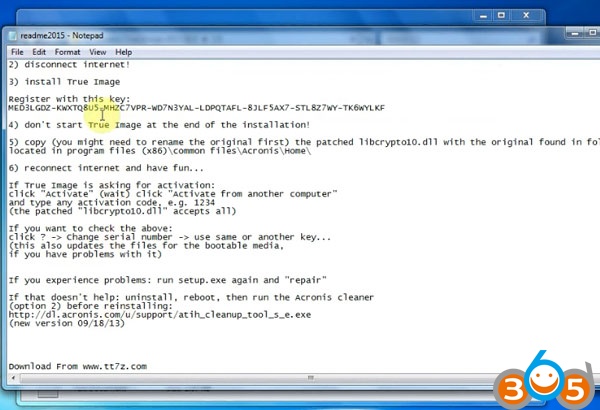
Open readme2015 notepad to check activation tips
install-volvo-vocom-ptt-2.03-12
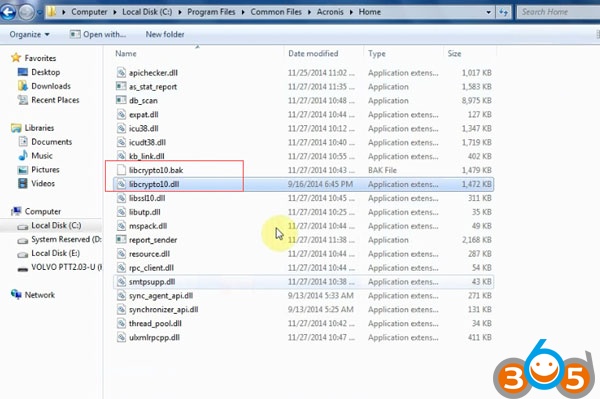
Open C://Program Files/Common Files/Acronis/Home, rename “libcrypto10.dll” to “libcrypto10.bak”
install-volvo-vocom-ptt-2.03-13

install-volvo-vocom-ptt-2.03-14

Copy “libcrypto10.dll” under VOLVO PTT 2.03 U Disk/Acronis True Image 2015 18.0/CK folder to C://Program Files/Common Files/Acronis/Home
install-volvo-vocom-ptt-2.03-15
install-volvo-vocom-ptt-2.03-16
Copy the register key  on notepad and paste here
install-volvo-vocom-ptt-2.03-17
Click ACTIVATE
install-volvo-vocom-ptt-2.03-18
Open location VOLVO PTT 2.03 U Disk->VOLVO PTT2.03->VOLVO PTT 2.03.20 &Flash-full_b1_s1_v1
install-volvo-vocom-ptt-2.03-20

Select Recover Disks button
install-volvo-vocom-ptt-2.03-21
Select the device need to be recovered
Click Recover Now
install-volvo-vocom-ptt-2.03-22
Restart the computer
install-volvo-vocom-ptt-2.03-23
Wait data recovery completed
install-volvo-vocom-ptt-2.03-24
Now you can run Volvo Tech Tool 2.03.20 diagnostic and programming software.