2019/04/25

Volvo VIDA 2015A Tested Version Download and install

Latest VIDA 2015A has been tested and verified working 100% by obdii365.com engineer. Where to download Volvo VIDA 2015A software:
volvo-vida-dice-2015a-1
Security: 100% safe to use
Software Version: 2015A
Cars: Volvo cars from 1999 to 2017
Language: English, Chinese
Compatibility: 100% confirmed to work with Volvo Dice china clone

Computer Requirement:
1. Operating system: Windows 7 Professional 32 bit or 64 bit
2. Internet Explorer: 9 or newer
3. Computer memory: 2G RAM +
4. C: space: must have 40GB
5. Location: software must install on C://
6. Others: It must be NTFS format

What does VIDA 2015A means?
If VIDA 2014D lists 2015 and 2015A cars.
2015A introduced Drive-E cars.
2014D will not do anything for 2016 cars like the XC90 because they introduced Ethernet as a connection option in the car. You won’t be able to get away with sticking DICE on a 2016 carry over model either that still uses an OBD2 interface. Only subscriptions to VIDA 2015 which is all online will help you.

“VIDA 2015 is 100% internet based, which means you will always have the most current information at your fingertips.”
Should be
“VIDA 2015 is 100% the end of hacks, and might be the end of shadetree Volvo diagnosis, depending on how high we price it.”

Volvo VIDA 2015A released notes:

WELCOME TO VIDA 2015
Welcome to the new VIDA. Several years of development have been put into this new workshop application. We have incorporated feedback from our users, as well as made changes to accommodate our future vehicles. VIDA 2015 has an extensive HELP section which can be reached at any time simply by hitting the “F1” button on your keyboard.
VIDA 2015 is 100% internet based, which means you will always have the most current information at your fingertips. Changes and corrections can be applied with a much shorter lead time.
Volvo Standard Time (VST) information is integrated into VIDA.
Starting with XC90, fault tracing will be displayed and shown in a ranked order.
Wiring Diagrams will be an integrated part of the repair process.
So install VIDA 2015 and explore the great changes and improvements of this new workshop application.

VIDA 2015A installation help:
User Name: admin or 1
Professional tech support by www.obdii365.com

Dice Vida 2015 features:
1. DICE – Diagnostic Communication Equipment, is a tool that used together with VIDA all-in-one to communicate with the vehicle. Communication makes diagnosis and troubleshooting the vehicle possible, as well as downloading software.
2. DICE has an integrated CARB cable, which is connected to the vehicle’s diagnostic socket. When connecting to the vehicle, DICE is powered as long as the battery is charged.
3. DICE has a folding hook that is designed for hanging the unit from one of the grab handles in the vehicle for example.
4. DICE is equipped with four status LEDs that indicate the status of the software, the USB and Bluetooth communication and the interface to the car.
5. At one end of the unit, there is a DC input where a battery cable or adaptor(12V) can be connected. The adaptor is used when upgrading and troubleshooting the DICE.
6. In the other end of the unit, there is a removable cover that could be removed by turning the screw on the cover.

Volvo Vida Dice functionality:
1. Administration – General information, design and function
2. Standard components, service materials and consumables. General information (among other things, control modules, SRS, general safety)
3. service and maintenance
4. Engine with mounting and equipment
5. Electrical system
6. Power transmission
7. Brakes
8. Suspension and steering
9. Springs, shock absorbers and wheels
10. Body and interior – among other things, diagnostics, design and function, repair and spare part information
11. Other – special vehicles, e.g., ambulances, police cars. Components that deviate from standard.

VIDA 2015A troubleshooting images:
volvo-vida-dice-2015a-2

volvo-vida-dice-2015a-3

volvo-vida-dice-2015a-4

volvo-vida-dice-2015a-5
source:

2019/03/12

How to program Volvo Truck all keys lost with PTT?

Question:
Can I can use PTT  Dev version 2.7  to program a transponder key for an FMX Volvo with all key lost?


Answer:
Yes. Volvo PTT (Premium Tech Tool) Developer tool  2.7.25 is able to add key and program all keys lost on Volvo heavy duty models.

In case of add or delete keys:
The function is located in CALIBRATE section.
Go to Calibrate menu->3-Electrical system and instruments->36623-3 Add or remove keys.
volvo-ptt-truck-key-program-1
To tun the operation in simulation mode select Run as simulated

Purpose:
Pair the ignition key with the CIOM so that the key can be used to start the vehicle
Note: In order to start the vehicle, each used key must be paired with the CIOM.

Procedure:
Calibration must be carried out when:
One or several new keys need to be added
-Only ne keys or keys that are already paired with this vehicle can be paired (keys paired with another vehicle will be    rejected)
-Once the pairing operation started, all previously paired keys must be paired again as a first step
-Finnaly, the new keys to be added can be paired

Key(s) need(s) to be removed
-Removal of keys from CIOM is done by pairing again all previously paired keys except the keys that will be removed

One or several keys need to be replaced by new keys. Replacement of keys must be performed in 2 steps:
-Pair again all previously paired keys except the keys that will be replaced
-Finnaly, the new keys to be added can be repaired
CIOM has been replaced by a new one.
volvo-ptt-truck-key-program-2
In case of all keys lost:
You need to order a new CIOM.
Particularly the necessity to replace the CIOM by a new one when all the keys are lost.
Then perform key programming with Volvo PTT similarly as key adding procedure.


http://blog.obdii365.com/2019/03/13/program-volvo-truck-transponder-key-with-ptt/

2018/12/12

Review: Volvo VIDA 2014D on Windows 10/8/7/XP macOS

Here are all from users answering you guys: What is the best operating system to work with Volvo Vice VIDA 2014D? Windows 10, Win 8, Win 7, Win XP or macOS?

Here you go…

Volvo VIDA 2014D Windows XP
  1. I’ve happily be using VIDA on my old Win XP laptop for a few years

  1. I have an old laptop (currently with Vista) and an old ASUS notebook running XP SP3.

  1. VIDA 2012, 2013A or D version software should be installed on Win XP or Virtual machine. But 2014A and new 2014D requires Win 7 O/S ONLY. that’s a huge development for VIDA DiCE kit. Leave alone WIN xp or VirtualBox

  1. I also run my VIDA in a XP virtual machine. No issues with mouse or USB, if you are familiar with VMware.

Volvo 2014D VIDA Windows 7
  1. I just went back to a Win7 machine running IE9 and I’m very careful with the updates. 2014D is supposed to work with IE10 but it didn’t when I tried it.

  1. While it says it works with ALL versions of Windows…it doesn’t actually.
However, it does have a GREAT setup instruction PDF that truly made setting up a VM super easy using Win7 Pro. Which then made setting up VIDA a breeze. I have it up and running and I even managed to connect to my older DICE unit.

  1. I’’m on 2014d and W7 pro

  1. I’m lucky in that I had an old laptop lying around that I could use solely for VIDA / DICE. Once I finally got it working (Win Pro 7 32 Bit, .Net 3.5), I turned off windows update, so that its configuration wouldn’t change. I assume that as long as I don’t change my car for a newer one, there is no benefit to an upgraded VIDA version (I’m on 2014D), or any further windows updates.

  1. I used 32bit Win7 Ultimate. It all works now.
My only issue is my car battery running out being left on pos II for a length of time!

  1. it must be Win 7 Pro ( or ultimate).

  1. It won’t work on 7 Home

  1. Vida 2014d will work fine with a fully updated Windows 7 Pro

  1. On any 32-bit Windows machine, RAM in excess of 3 GB will be unrecognized by the OS

  1. I have VIDA 2010D on Windows 7 Home Premium.

  1. IE 8 and install on Win7.

  1. VADIS on Win7 x64 with IE8 works like a charm

  1. I run VIDA 2010D on Windows 7 professional 32-bit with Chrome Version 23.0.1271.97 – No problems

Good to know: Windows 7 32 bit is the only operation system that tested by real pros:
You can have VICE VIDA 2014D on Windows 7 with 100% success

2014D VIDA DiCE Windows 8
  1. I had it working with Windows 8.1 until an unknown update broke connectivity to DICE and no amount of system restore would bring it back. I guess 2014D works ok, but be aware an update may blow it up in the future.

  1. DiCE was working with Vida2014B and Windows 8.1, but stopped working when I upgraded to Windows 10 yesterday.

  1. Need to uninstall the IE existed on the system, (probably IE9) first, then it should be able to install Win 8.

  1. win8 & ie10 sure don’t play well with anything, can’t downgrade in win8 either, that’s what that compatibility mode is for.

Volvo VIDA 2014D Windows 10
  1. Win10 with Vida 2014D and DiCE is now working. And I have connected to a separate ME9 and read some data from it.

  1. Windows 10 is causing tons of compatibility issues across the board. You may have to VM until updates.

  1. I have been using 2014D VIDA on my win10 tablet for few months and it even works via integrated Bluetooth!!!
volvo-vida-2014d-win10
Volvo VIDA 2014D Windows Mac
I run mine on a Mac using WinXP + VirtualBox VM without any problems. But UI is a little clunkier with a VM.

I have an old Win XP Dell that I use exclusively as a VIDA/DiCE box and I use VMWare Fusion/Win7 VM on a Mac for a VIDA reference source.

I have XP pro on my Macbook Pro in VirtualBox and that is working fine.

Have a walk through for the Virtual Box
Here i would describe details of the system, HD size, Ram amount, processor type, you’ll need to be running in XP virtual nachine, provided you have the size described above plus IE8, you may want to disable your firewall and antivirus during installation. at least 2GB of ram, more than 20GB hard disk, preferably 40GB + , I don’t remember the processor type but mine is pentium 4 quore duo works ok, IE8 when you have those, your installation will be okay.

VM Ware player is compatible with Win XP, Vista 32 & 64 bit as well as Win7 32 & 64 bit
I have it running on my main PC and it works!

http://blog.obdii365.com/2018/12/12/volvo-vida-2014d-windows-macos-reviews/

2018/08/24

Dice VIDA Software Programs Volvo S60 CEM: Done!

Success! You have good luck to program Volvo S60 the year 2002 using VOLVO VIDA software.

After replacement of a failed CEM (central electronics module) on a 2002 Volvo S60, the software needs to be downloaded to the vehicle. This is done through Volvo VIDA software: http://www.obdii365.com/wholesale/2014d-vida-dice-diagnostic-tool-for-volvo.html

You need to buy a subscription from Volvo to gain access to the software files that you need to download, and then reload to the new DIM.

You need to be online. When you get a subscription, you gain access to VIDA 2014D but you still need to purchase and download the specific software you are re-loading, in this case, the CEM. It is a very time consuming process, especially if this is the first time you are programming. Lots of reading in their site. Hope this helps.

Here you go. Numerous communication faults found…
volvo-vida-dice-s60-cem-1
…due to a failed CEM
volvo-vida-dice-s60-cem-2
After CEM replacement, software is downloaded to vehicle
volvo-vida-dice-s60-cem-3
Programming a new control module
Programming of codes in progress in central electronic module (CEM)
volvo-vida-dice-s60-cem-4
The keys are manually programmed to the vehicle during the download
volvo-vida-dice-s60-cem-5
The diagnostic trouble codes are erased in all systems
volvo-vida-dice-s60-cem-6
The software has been downloaded into the vehicle
Carry out a pre-delivery check before returning the car to the customer
Note: during certain download sequences, the clock in the car will stop. Check and adjust as needed.
Select OK to finish the download sequence and to close this tab
volvo-vida-dice-s60-cem-7
volvo-vida-dice-s60-cem-8
The software download is complete

Done!

2018/05/16

Will Volvo VOCOM II work with Tech Tool 2.05.xx?

Confirmed! Vocom I can (Vocom 88890300) work with Tech Tool 2.05.xx, while Vocom II (genuine) failed.


Tool: Vocom 88890300 interface and Vocom II
volvo-vocom-i
volvo-vocom-ii
Program: Premium Tech Tool (fresh 2.0.587 install, zero issues)
I installed PTT 2.05.87 . Then updated the APCI and APCI+ from what I could find on this forum in various threads.
ptt-2-5-87
Truck: 2012 USA VN

Error message:
Error
It was not possible to select any operations for the selected product
Detailed information
Code: 0
Description: unit retrieved from Baldo Local is unknown: US…

While I wait for my original Vocom 2 to arrive from Volvo, I borrowed a Vocom 88890300 from a friend. It connects to the truck (2012 USA VN) but when I try to calibrate or program it gives me the error in the first picture. I also took a screenshot of the connection status (see second picture). Is this error caused by PTT (fresh 2.0.587 install, zero issues), the Vocom interface or by the APCI’s I updated from a file someone sent me. Are the European/Asian APCI’s and APCI+’s identical with the USA ones? Any opinions will be greatly appreciated, I have some work to do on the truck and can’t wait until the V2 arrives. Thank you.
volvo-ptt-error-1
Connection:
Communication unit: vocom 88890020/88840133
Mode: usb
Status: active
volvo-ptt-error-2
Tech support from real pros working for obdii365.com:

Vocom II does work with 2.5.xx. you just need to install the drivers. If you want to have Volvo Tech Tool 2.5.xx on Vocom, try this Vocom 88890300 Interface or make sure yours same as the one displayed below
http://www.obdii365.com/wholesale/volvo-88890300-vocom-interface-with-ptt-software-preinstalled.htmlReal professionals have helped test Tech Tool version 2.5 on the Vocom I, working perfect!
volvo-tech-tool-2-5-86-pic-1
volvo-tech-tool-2-5-86-pic-2
volvo-tech-tool-2-5-86-pic-3
volvo-tech-tool-2-5-86-pic-4
Tech Tool 2.5.xx tested good:
2.6.xx already has the drivers for Vocom I and II preinstalled
Firstly APCI can update online via PTT so it should be suitable for US trucks when users all are using it.
Secondly the APCI+ files available here works fine on US Volvo trucks as well as other regions. Some users have tested it.


2018/03/26

How to install Volvo VIDA DiCE 2014D 2 Software CDs

Volvo VIDA DiCE diagnostic scanner new package comes with 2 software DVDs/CDs (old package comes with 1 software CD only). Setting up 2 software CDs is different from 1 CD. 


Note: If you have only 1 software CD, follow instruction here to install VIDA 2014D.
http://vidadice.blogspot.com/2017/11/install-volvo-vida-dice-2014d-on-windows-7.html


If you have 2 software CDs in DiCE package, follow guide below to install software.


How to install Volvo VIDA 2014D with 2 Software CDs on Windows 7 64 bit?


Volvo Vida Dice Requirement on computer:

1. It must be Windows 7 professional operating system
2. It need to be Internet Explorer 9 !!!
3. Computer memory needs to over 3GRAM
4. C:// must have 40GB space
5. Software must be installed under C://
6. It must be NTFS format


Step 1: Install VIDA Setup

Launch Windows Internet Explorer 9
Click on Setup->About Internet Explorer
install-vida-2014d-2cd-1

Delete IE9 Windows 7 x86 enu shortcut on desktop

Open VIDA2014.1 software CD

Copy VIDA2014D.part1 and paste it to Computer/Software (D:)
install-vida-2014d-2cd-2

Open VIDA2014D.2 software CD

Copy VIDA2014D.part2 and paste it to Computer/Disk D
install-vida-2014d-2cd-3

Then extra VIDA2014D.part1 zip file

Open VIDA2014D.part1 folder

Copy and paste Patch VIDA 2014-A-B-C-D to desktop
install-vida-2014d-2cd-4

Open Software (D:)/VIDA2014D folder->Install->DVD->Vida_dvdheader->Main

Run Setup as Administrator 
install-vida-2014d-2cd-5


Install VIDA setup

Select VIDA All-in-one, press Next
install-vida-2014d-2cd-6


Select software language
install-vida-2014d-2cd-7


Choose destination location C://VIDA/, press Next
install-vida-2014d-2cd-8


Accept license agreement,press Next

Installing Framework35

VIDA installation in progress. Wait until the installation is completed

Installation complete will generate a few files on desktop
install-vida-2014d-2cd-9


open Vida Configurator

Select connection type to central systems as "Internet" and Save
install-vida-2014d-2cd-10

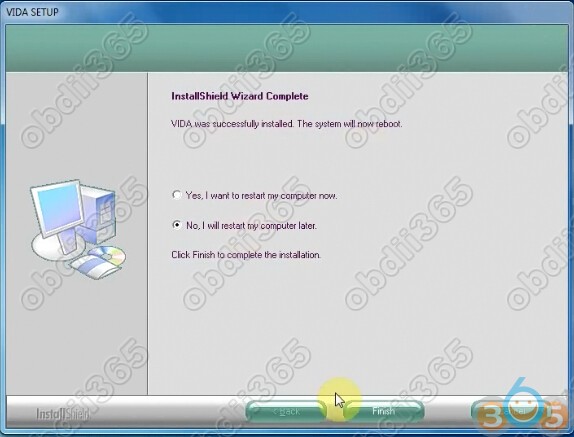
VIDA Setup finished, select restart computer later
install-vida-2014d-2cd-11

Step 2: Install Patch VIDA 2014D


Extra Patch VIDA zip file and paste patch 2014A.exe on desktop
install-vida-2014d-2cd-12

Install patch, select destination folder to C://,press Install

Connect Volvo DiCE interface with computer via USB port System will automatically install the driver DiCE-206751 @ 000000000000 device driver successfully installed

Allow windows firewall access

Delete Patch, Adobe Reader XI and 2014A.exe on desktop
install-vida-2014d-2cd-13

Step 3: Run Self Test

Run Vida All-in-one as Administrator
install-vida-2014d-2cd-14


Enter Username:1 and log in
Open Computer->Manager->Device Manager->DiCE Hardware to check scanner is well connected 
install-vida-2014d-2cd-15


Define vehicle profile

Select Communication Tool: DiCE-206751

Press DICE Configuration->Test Communication Tool
install-vida-2014d-2cd-16
Click Run to run self test
install-vida-2014d-2cd-17


Self test okay

Connect DiCE unit with vehicle

Read vehicle information and run diagnostic function 
install-vida-2014d-2cd-18
install-vida-2014d-2cd-19

2018/01/10

Volvo VIDA DiCE 2014D failed to login Solution

Free download VIDA 2014D patch when you fail to log in.

Volvo VIDA Dice 2014D cannot log in:
When the user name is entered, the interface will pop up “please wait” and jump into a blank page for seconds, then back to the login interface.
volvo-vida-2014d-fail-login-1

volvo-vida-2014d-fail-login-2

volvo-vida-2014d-fail-login-3

volvo-vida-2014d-fail-login-4
 If your computer date/time is newer than 31/12/2018 and you fails to login VIDA All-in-one, please download patch here:
Run Patch.cmd and Vida 2014D works like a charm
volvo-vida-failed-login-solution
Note: this patch only works for VIDA 2014D; cannot be used for VIDA 2014A

Tech support from obdii365.com

http://blog.obdii365.com/2018/01/10/solved-volvo-vida-2014d-cannot-log-in/